Book Design MS Word vs InDesign
Book Design, Self-Publishing

Book Design Knockdown: MS Word vs Adobe InDesign

Lately, a few talented writers have contacted me with their pre-press production problems. Now, most new authors want to typeset their non-fiction book in Word, but Word is designed for word processing and not so much for book design. However, some authors want to be able to access the file again — and if they are not worried about the colours (inside) not being controlled, then there are workarounds. But Adobe InDesign is the industry standard for book design, so let’s discuss MS Word vs Adobe Indesign. Remember, the interior of any book is completely separate to the cover. To dispel another myth, you can print bleed images right to the edge of your file (when setting up for IngramSpark or CreateSpace) and no, you don’t need to have a border. Bleed means going beyond the page (e.g. 3mm beyond). What you need…
Read more
advertising books in magazines
Book Marketing, Self-Publishing

Advertising your New Book in Magazines

Advertising a new book in magazines is a choice fraught with spending anxiety. Most Australian authors self-publishing (those surveyed) do not make much income from their writing — about $12,000 p.a. from royalties on average — so advertising and its results need to be assessed with a realistic view. Australian Book Advertising The first choice is whether to advertise in a Title Showcase in the dual deal:  Books+Publishing magazine and Good Reading magazine ($340 for a small listing). For Good Reading magazine, however, this advertising goes to a huge market of 50,000. This would be more worthwhile if you have a distributor, because that’s just the way it works in book retail land. If you’re a nonfiction author doing a blitz, then consider pulling out all stops with their combo deal. Combined Marketing Package for $530 AUD (incl GST): 1 x Title Showcase listing to appear…
Read more
Types of Interactive eBooks
Self-Publishing

Two Types of Interactive eBooks that you can Make

You might already know there are two kinds of eBooks: Fixed Format and Reflowable. Fixed format suits grand layouts with images, whereas reflowable ebooks suits 90% of text-based books.  There are also two types of interactive ebooks:  ePub and PDF. Today I set about making an Interactive ePub from a plain fixed format, directly in InDesign. While there are many more elements to discover, I think I’ve got the hang of animations and buttons. There is a handy Adobe InDesign tutorial to learn how to add animations, slide shows, and buttons to an ePub. I noticed that their “workspace” is designated as ePub, whereas my CC 2017 version says “Interactive”. This workspace helps to bring up the right menus on the side. I find it fun to put some animated graphics on pages that were blank, or where I wanted to illustrate the words.…
Read more

Five Ways to Make Better Book Profits

Here we are all for better book profits for non-fiction authors, with fewer costs; that’s what it’s all about, really.  So first we’ll knock off some easy wins and then move onto advanced methods. 1. Keep your Book Production Costs Low My first tip for better book profits is keeping production costs low in the first place. This may mean using a Book Design template and learning styles in Adobe InDesign*, or simply keeping production costs to a minimum by getting three editing quotes from editors with testimonials. The other way to save costs is to use Print on Demand, ordering a small number of personal author copies, like ten, rather than ordering in bulk from a printer (conceivably less per copy, but with a much higher risk). Making better royalties also depends on the LENGTH of your book and black-and-white versus full…
Read more
Book results on Google

Connecting your Book Titles to You for Better Google Visibility

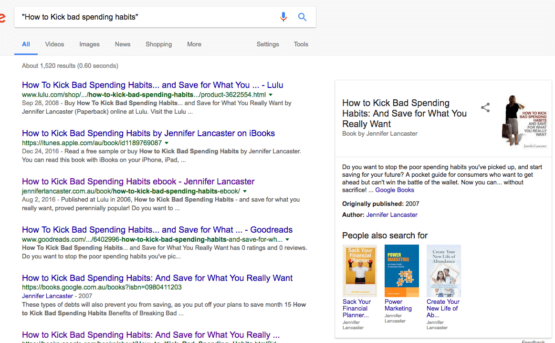
This post is about Google’s ‘Knowledge Graph’, aka beautiful author and book plates that show up in title searches. Yes, us authors always moan about having to buy an ISBN. Relax, you are going to love this secret I found out. Multiple book authors with ISBNs get the Google star treatment! The benefits of having your own ISBN at Thorpe Bowker: It is yours to keep up to date (not a publisher you can’t get hold of), you get to inform library suppliers and so help along sales, You can assign a library discount, discounts to retail, and You may be assigned a section by Google which matches your ISBNs to you and brings up a special box with all your books in it when someone does an exact title search on Google. I love that bit the most!  Find below…
Read more
security for ebooks

Security for your eBooks

An enquiry came in today about ‘how do I keep my eBook secure?’ Let’s look at the various ways to help increase its security. The answer depends on whether your ebook is hosted by a retailer, e.g. Amazon or iBooks or Smashwords, or is in PDF form on your own website. The retailers, although letting buyers lend their ebook to friends for one week in the case of Amazon (optional), have digital security in place as much as possible. After all, they want their cut as well as giving you yours. You can also put a message in the front of the ebook, along the lines of “This book was distributed at Amazon, if you received a copy for free, this is not authorised by the publisher, so please return to Amazon to buy a copy”. Or some such. But… you may…
Read more
Filters